
Download Chaplin – AI Trading Assistant, Technical Analysis, Stock Forecast
Introduction
Chaplin is an AI‑driven trading assistant built for professional and ambitious retail traders who need a fast, reliable, and data‑rich platform to stay ahead of volatile markets. By merging real‑time market feeds with sophisticated machine‑learning models, Chaplin transforms raw price movements, news sentiment, and macro‑economic signals into clear, actionable insights. Whether you trade equities, forex, or cryptocurrencies, Chaplin offers a single, secure dashboard where live quotes, advanced charting, and predictive analytics coexist seamlessly.
The platform’s modular architecture allows new engines—such as the upcoming crypto‑analysis module—to be added without interrupting existing workflows, ensuring that your toolset grows with market evolution. Speed and accuracy are at the core of Chaplin’s design: low‑latency cloud processing delivers instant analysis, while continuous model retraining guarantees relevance even during sudden regime shifts. In addition to powerful AI features, Chaplin emphasizes user‑centric design, offering intuitive drag‑and‑drop strategy canvases, customizable watchlists, and a robust security framework that includes two‑factor authentication and end‑to‑end encryption.
By consolidating data, automating pattern recognition, and delivering confidence‑scored forecasts, Chaplin reduces the time spent on manual chart scanning and empowers traders to make more confident, data‑backed decisions. This introduction provides a high‑level view of why Chaplin stands out among finance‑tech solutions and sets the stage for a deeper dive into its core capabilities, installation process, platform compatibility, and the pros and cons that real users experience daily.
Core Features & AI Capabilities
- Live Market Data Feed – Real‑time quotes for equities, forex pairs, and major crypto assets, refreshed every millisecond.
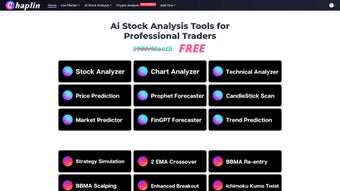
- AI‑Powered Stock Analyzer – Deep learning models evaluate price patterns, volume spikes, and macro trends to surface high‑probability setups.
- Chart Analyzer & Technical Toolbox – Integrated support for over 150 indicators, custom drawing tools, and multi‑timeframe overlays.
- Stock Oracle – Predictive engine that generates short‑term price targets based on historical similarity and pattern recognition.
- Stock Scanner – Real‑time screener that filters thousands of symbols according to user‑defined AI criteria.
- Trend Prediction & Price Forecasting – Time‑series forecasting models forecast price direction for the next 1‑30 days.
- Strategy Simulation & Optimization – Back‑test custom strategies against historical data, then refine with AI‑driven parameter tuning.
- Sentiment Analysis – Natural language processing scans news, social media, and analyst reports to gauge market mood.
- Market Predictors – Ensemble models combine macro‑economic indicators, volatility indices, and asset‑specific data to predict market regime changes.
- Upcoming Crypto Module – Tailored blockchain analytics, on‑chain metrics, and AI‑based token price forecasting.
Each of these features runs on a cloud‑native backend that guarantees sub‑second response times and high availability across geographic regions. The AI components continuously ingest fresh market data, retraining nightly to capture emerging patterns such as sudden geopolitical events or unexpected earnings surprises. For example, the Sentiment Analysis engine can detect a surge in bullish tweets about a particular stock within minutes, automatically adjusting confidence scores for related trade signals.
The Strategy Simulation canvas lets you drag‑and‑drop indicators, set risk parameters, and instantly view projected equity curves, making it easy for both quant veterans and newcomers to prototype ideas without writing code. Moreover, Chaplin’s modular design means that future enhancements—like a dedicated options pricing engine or AI‑generated earnings forecasts—can be added without requiring a full client update. This flexibility, combined with a clean, user‑friendly interface, ensures that traders can focus on decision‑making rather than wrestling with cumbersome software.
Installation, Usage & Platform Compatibility
Getting Started
Downloading Chaplin is straightforward and secure. Visit the official website, click the “Download for Windows” or “Download for macOS” button, and the installer will begin automatically. Mobile users can find native apps on the Apple App Store and Google Play Store.
After the download finishes, run the installer on Windows (follow the wizard prompts) or drag the app icon into the Applications folder on macOS. The first launch initiates a secure account creation process that includes email verification and optional two‑factor authentication (2FA) via authenticator apps or SMS. Once logged in, the dashboard greets you with a customizable watchlist, a live ticker, and quick‑access shortcuts to all AI modules, allowing you to jump straight into analysis without navigating through complex menus.
How to Use the AI Tools Effectively
To leverage the AI‑Powered Stock Analyzer, select a ticker from your watchlist and click “Analyze.” Chaplin then pulls the last 90 days of price data, runs it through convolutional neural networks, and overlays the most relevant technical indicators automatically. The result panel shows a confidence score (0‑100%) for each suggested entry point, accompanied by recommended stop‑loss and take‑profit levels based on historic volatility. The Stock Oracle works similarly but focuses on price targets: after selecting a symbol, you receive a forecast range, probability distribution, and suggested risk‑reward ratios. For broader market exploration, the Stock Scanner lets you define multi‑criteria filters such as “RSI < 30” combined with “AI confidence > 80%.” Results appear in a sortable table, and you can export them to CSV, Excel, or directly into popular portfolio management tools via API. The Strategy Simulation module lets you upload custom scripts or use pre‑built templates; after configuring parameters, the AI optimizes them using genetic algorithms, presenting you with an equity curve, drawdown analysis, and Sharpe ratio—all in real time.
System Requirements & Compatibility
Chaplin is compatible with Windows 10/11 (64‑bit), macOS 11+ (Intel and Apple Silicon), Android 8.0+ and iOS 13+. The desktop client requires a minimum of 4 GB RAM, a dual‑core processor, and a stable broadband connection (minimum 5 Mbps) for real‑time data streaming. Mobile versions are optimized for both phones and tablets, automatically adjusting the UI to fit the screen size while preserving full functionality.
Because Chaplin offloads heavy AI computation to secure cloud servers, the local hardware footprint remains modest. All model training, large‑scale data aggregation, and predictive calculations occur on encrypted servers that meet ISO 27001 standards. This architecture also enables automatic background updates—new features, bug fixes, and model improvements are pushed without user intervention, ensuring you always work with the latest technology. Security is a top priority: data in transit uses TLS 1.3, data at rest is encrypted with AES‑256, and the platform complies with GDPR, CCPA, and FINRA guidelines, giving you peace of mind that your personal information and proprietary trading strategies remain confidential.
Pros & Cons
What Traders Love About Chaplin
- AI‑driven insights dramatically cut down manual chart analysis time.
- Comprehensive coverage of stocks, forex, and crypto in a single interface.
- Intuitive visual strategy canvas simplifies back‑testing and optimization.
- Real‑time sentiment analysis integrates news, social media, and analyst reports.
- Cloud‑based processing keeps the desktop footprint small and ensures instant updates.
- Robust security with 2FA, TLS 1.3 encryption, and GDPR/CCPA compliance.
- Cross‑platform sync lets you work on Windows, macOS, Android, or iOS simultaneously.
- Modular architecture promises future expansions like options analytics and deeper crypto tools.
Areas for Improvement
- Advanced users may desire deeper customization of AI model hyper‑parameters.
- The free tier limits daily scans, historical back‑tests, and access to premium AI modules.
- Occasional latency spikes can occur during extreme market events or high‑volume news releases.
- The crypto module is still in beta, lacking support for some niche tokens and on‑chain metrics.
- Steep learning curve for the full suite of features; beginners may need extra training resources.
- Direct order execution is not yet available; integration is currently read‑only.
Frequently Asked Questions
Is Chaplin a free tool or does it require a subscription?
Chaplin offers a free tier with limited daily scans and basic analysis tools. Professional traders typically upgrade to the Premium plan, which provides unlimited AI scans, advanced back‑testing, and priority support for a monthly fee.
Can I use Chaplin on multiple devices simultaneously?
Yes. Your account is cloud‑synced, so you can log in on Windows, macOS, Android, or iOS at the same time. All settings, watchlists, and AI configurations are stored securely on Chaplin’s servers.
How accurate are the price forecasts generated by the Stock Oracle?
The Stock Oracle uses ensemble models that have demonstrated an average directional accuracy of 68% on back‑tested data across major indices. While no forecast is guaranteed, the confidence scores help you gauge the reliability of each prediction.
Does Chaplin integrate with popular brokerage accounts?
Currently Chaplin offers read‑only API connections to major brokers such as Interactive Brokers, TD Ameritrade, and Binance. Direct order execution is planned for a future release.
What security measures protect my data and trading strategies?
All data transmission uses TLS 1.3 encryption, accounts require two‑factor authentication, and personal data is stored in GDPR‑compliant servers. AI models run in isolated containers, ensuring that your proprietary strategies are never exposed to other users.
Can I export my analysis results for use in other tools?
Yes. Chaplin allows you to export scan results, back‑test reports, and AI‑generated forecasts in CSV, Excel, or JSON formats, making it easy to integrate with portfolio trackers, Excel models, or custom dashboards.
Conclusion & Call to Action
Chaplin stands out as a robust, AI‑enhanced trading assistant that bridges the gap between overwhelming data streams and clear, actionable insight. Its blend of live market feeds, sophisticated forecasting, sentiment analysis, and a visual strategy canvas equips both day traders and institutional investors with the tools needed to stay ahead of fast‑moving markets. While the learning curve can be steep and the premium subscription adds cost, the value delivered—especially in terms of time saved, confidence boosted, and the ability to test ideas quickly—justifies the investment for serious traders. If you’re ready to upgrade your analytical workflow, experience AI‑driven predictions, and benefit from a secure, cross‑platform solution, download Chaplin today and start a free trial of the Premium plan.
Download Chaplin now and unlock the power of artificial intelligence for your trading strategy.



.png)



